
It’s not just posts that accumulate on a blog. The process of solving problems, the moments when I learned something new, and my perspectives on various topics are all preserved there as well. Over time, these records become an asset that shows what I’ve been thinking about and how I’ve changed.
So where should this asset be stored? Even if the service I use for writing changes or disappears, shouldn’t I be able to continue storing and managing it myself?
Gitblog is a service that lets you store public posts and blog code in your GitHub repository, and write posts via the web or an AI agent to publish them on your blog. Built on the foundation of directly owning and managing your content, we’ve added features that make writing convenient and help you connect with readers.
Gitblog was created based on five key principles.
1. You should own and manage the posts you write
The longer you write, the more important it is to have the confidence that you’ll always be able to revisit your work. We believe authors should be able to store, edit, and—if necessary—move their records elsewhere themselves.
Public posts on Gitblog are stored as Markdown files in your GitHub repository. You can also manage blog files—including images—and code together. If you download the repository to your computer, you can read, edit, and back up your posts locally, and you can also review previous versions using Git’s change history.
Even if the Gitblog service were to shut down, the posts and blog code stored in your account’s repository and on your local machine would remain. As long as you maintain your hosting and domain, you can continue to serve the deployed static blog, and you can move the files to a different hosting provider if necessary. However, integrated features provided by Gitblog—such as browsing and subscription—depend on the service’s operation.
This is why we chose a GitHub-based solution. Many people are already using it, and it provides the foundation to start a blog through public repositories and GitHub Pages. Even with GitHub Free, you can use Pages hosting for public repositories. The scope of service and usage limits follow GitHub’s policies.
No matter where you write your posts, you should retain control over the original version of your public posts. This is Gitblog’s first principle.
2. It must be a blog that supports AI
Writing with AI is becoming second nature. We use it to create drafts from notes, organize complex content, refine sentences, and translate into other languages. Just as coding agents read and modify project files, I believe agents that assist with writing should also be able to directly handle files in a blog.
Gitblog’s blog repository contains writing, translation, and verification guidelines and commands for AI agents to reference. If you designate your blog repository as a workspace for an agent capable of reading, modifying, and executing commands on local files, you can draft posts and prepare them for publication within that environment. With the necessary authentication and permissions, you can even proceed to deployment.
For example, you can make a request like this:
Read the AGENTS.md file in this blog repository and follow the writing guidelines. Write a post based on the notes I’ve left, and save it as a draft so I can review it.
After reviewing the draft, you can request translation, verification, and deployment. The available tasks vary depending on the agent’s file access scope and command execution permissions. The specific workflow is outlined in the Blog Writing and Translation Guide.
Gitblog does not force you to use a specific AI model for writing. You can write directly on the web, use an editor you’re familiar with, or work alongside AI. Our goal is to allow authors to choose the tools that best suit their style.
3. Good content should be discoverable regardless of language or tool
Once a post is published, someone needs to discover and read it. Some people find answers through search engines, while others encounter relevant content by asking questions on AI services. There are also readers who read in languages other than the one you use.
Gitblog provides a structure for multilingual publishing, search, and AI accessibility to reach these readers.
First, you can translate the original text—written in your preferred language—into your chosen language and publish it. We support both automatic translation via the DeepL API and the submission of translations reviewed and approved by humans or LLMs. A separate API key is required for DeepL automatic translation. If you manage translations yourself, we provide a process to ensure that translations remain up-to-date whenever the original text is modified.
Additionally, the template includes the following foundational elements so that search engines and AI tools can identify the content and source of the article:
- Page Information for Search: Provides the title, description, original URL, sitemap, and links to pages in different languages.
- Structure explaining the context of the post: Provides structured data such as the author and publication date, and allows you to add key answers, sources, and questions and answers as needed.
- Direct access to the text: Depending on the settings, it provides the Markdown version of public posts and the post list named
llms.txt.
This design takes into account discoverability in search, answer, and generative AI environments—commonly referred to as SEO, AEO, and GEO. The goal is to present the article’s body and context in an easy-to-read format. Search result rankings and citations in AI responses are determined by each service and are not guaranteed solely by translation or technical settings. Guide to Search and AI Access.
You can also discover posts within Gitblog. Posts from blogs participating in the feed are curated and displayed on exploration screens such as “Latest Posts,” “Popular Posts,” and “Trending.” Readers can find posts that interest them and navigate to the author’s blog to read them.
Our goal is to increase the likelihood that the content you share will reach those who need it.
4. Engagement with a post leads to connections on GitHub
When you read a good post, you naturally become curious about the author’s next one. You’ll want to find out what kind of projects they’re working on and what other thoughts they’re sharing.
On Gitblog, this interest extends to connections on GitHub. Subscribing to a blog is linked to a GitHub Star on the corresponding repository, and following an author is linked to a Follow on their GitHub account. Readers can curate posts from blogs or authors they’re interested in, and authors can connect with readers on GitHub through their posts.
It may seem trivial, but we believe this connection is meaningful. This is because writing and thoughts are added to the picture revealed through code and projects. Posts explaining decisions made in a project, the process of solving problems, and lessons learned become another avenue for understanding that person’s work.
The number of stars or followers does not determine the value of a post. However, the fact that readers who resonate with your writing may come to look forward to your next post can be a reason to keep writing consistently.
5. Writing Remains Important Even in the Age of AI
We write when we ask questions of AI. We explain the desired outcome, outline the conditions, and ask follow-up questions as we read the responses. Even when AI generates prompts and drafts for us, the process of deciding what to request and which results to accept remains.
Writing is also a process of examining one’s own thoughts. As we write sentences to explain our ideas, we begin to see gaps in what we thought we knew. We seek evidence, correct contradictory claims, and connect the context so that others can understand.
Even as AI takes on more tasks, we strive not to forget our role as the ones who decide what matters and how to act. Not losing sight of our own thoughts and judgments, even in writing co-authored with AI—that is the kind of writing we aspire to.
I hope Gitblog can be a space where we continue this practice—a space to explain what we’ve learned in our own words, to preserve our experiences as contextual records, and to develop our thinking by rereading them over time.
I hope that building a collection of good writing becomes a process of honing your intellect.
Getting Started with Gitblog
You can start Gitblog using Studio on the web, or you can create a blog repository directly on GitHub and run it locally on your PC. First, let’s look at how to use Studio.
1. Sign up with a GitHub account
Go to Gitblog and sign up or log in with your GitHub account. After logging in, navigate to Studio, where you can create and manage your blog.
2. Connect the GitHub App and Create a Blog
Follow the instructions in Studio to install the Gitblog app on GitHub and grant access to the repository where you’ll manage your blog. Preview and select a template, then choose a blog title and repository name.
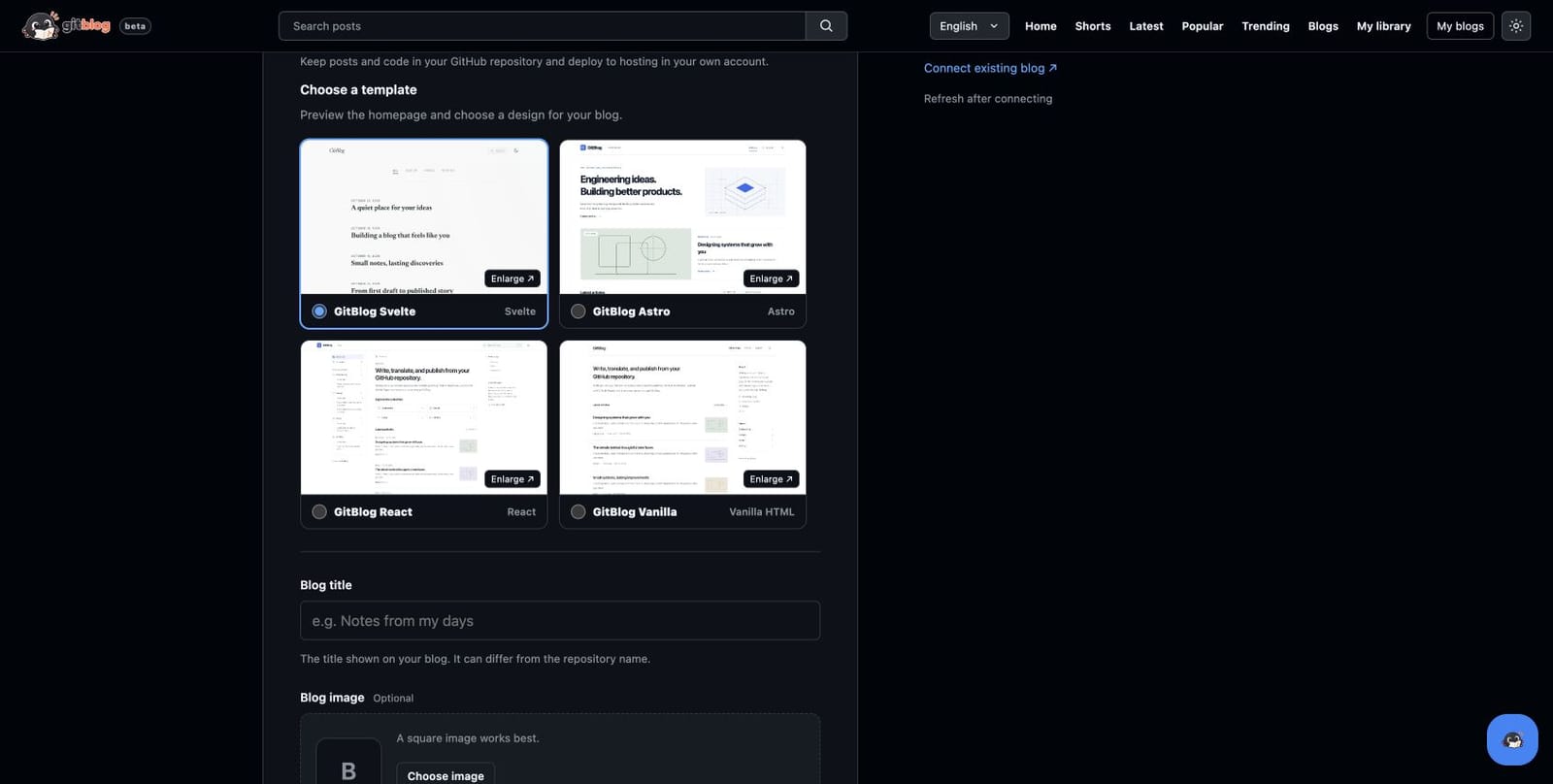
The template selection screen in the English version of Studio. As of November 3, 2026.
Your blog files will be created in your GitHub repository. You can host your blog using GitHub Pages or connect your Cloudflare account to use Cloudflare Pages. Once you’ve completed the deployment setup for your chosen method, you’re ready to publish posts.
3. Writing and Publishing Posts in Markdown
On the post editor screen in Studio, enter the title, description, and Markdown body text. You can also upload a cover image for the post thumbnail and images to include in the body.
While writing, save your work as a draft, review the content, and then save it as published. After saving, check the build and deployment progress, and once deployment is complete, you can read the post on your blog. If translation is needed, you can set up the blog’s translation languages and configuration to manage them alongside your blog.
Getting Started on GitHub and Your Local PC
If you prefer working in a local editor or with an AI agent, you can select your preferred official Gitblog template on GitHub and get started right away.
- Create your blog repository using a template. Go to the GitHub page for the official template you want and use the template to create a new public repository in your account. This will create a blog repository that you manage, separate from the original template.
- Clone your repository to your local PC. Run
git cloneusing the URL of the repository you created, then open the downloaded folder in your editor or AI agent. Follow the template’s instructions to install the necessary development tools and dependencies, and complete the initial setup, including your blog URL, language, and hosting. - Write and review posts locally. Write a Markdown post and add images in
content/posts/. You can edit it directly or ask the agent to readAGENTS.mdand follow the writing guidelines. After reviewing the draft, set it to published status and run the validation process provided by the template. - Upload the changes to GitHub and deploy them. When you commit the post and images and push them to the target branch, the configured GitHub Actions workflow will build the blog and deploy it to your chosen hosting service. Verify the Actions run results and check whether the changes have been reflected on the actual blog page.
The first time, you must prepare the deployment environment according to the Initial Setup Guide for your chosen template. After that, you can continue writing posts following this workflow: Write locally → Review and validate → Commit and push → Verify deployment.
Even if you created your blog directly on GitHub, you can grant the Gitblog App access to that repository and manage it using Studio’s existing blog connection feature. Simply choose the method that best suits your workflow: working on the web or working locally.
Start where your writing lives
Gitblog aims to be a platform where you can store your posts in your account, write using familiar tools, and reach readers through various languages and channels. At its core is the belief that writing helps you gain a deeper understanding of your own thoughts.
You don’t have to write a perfect post right from the start. Try recording a fact you learned today, a question you’ve been pondering for a long time, or a problem you solved yourself. The process of adding context to that record and refining it will lead to your next post.
Build up your thoughts on a blog that you own and run.
CONVERSATION
Join the conversation